

A zero-day exploit can turn routine vulnerability management into immediate containment. This article explains what the term means operationally, how zero-days unfold, and what disciplined defensive work looks like before and after a fix exists.
Zero-Day Terms In Practice
A zero-day situation starts when defenders do not yet have reliable, vendor-provided remediation for a vulnerability. NIST defines a zero-day attack as an attack that exploits a previously unknown hardware, firmware, or software vulnerability.
In daily operations, teams often blur three related terms. Keeping them distinct improves decisions and executive communication.
A zero-day vulnerability is the flaw before a patch or official fix is broadly available, and often before defenders have high-confidence detection content. A zero-day exploit is the technique used to take advantage of that flaw. A zero-day attack is the real-world use of that exploit against targets, including attempts that fail.
A vulnerability can exist without exploitation. An exploit can exist without widespread use. When there is credible evidence of active exploitation, priorities shift from planned remediation to time-bound risk reduction.
Why Zero-Days Disrupt Operations
Zero-days disrupt operations by compressing timelines. With known vulnerabilities, teams typically inventory affected assets, test patches, schedule rollout, and validate. With a zero-day, the sequence often reverses: contain first, then determine what is affected, then patch, then clean up. One exception is a business-critical service with no workable mitigation or redundancy. In that case, teams often limit exposure and increase visibility while preparing to isolate if indicators worsen.
For business leaders, the operational risk is uncertainty. You may not know the entry point, the full blast radius, or whether there is a safe patch window. That uncertainty is why early executive alignment matters, especially on emergency changes that affect uptime or user experience.
For technical teams, the challenge is signal quality and decision ownership. Early indicators can be noisy, vendor guidance can evolve, and attackers may chain multiple weaknesses. A practical approach is to treat early vendor mitigations as interim controls, assign an owner to track guidance changes, and time-box re-evaluation as evidence improves.
Zero Day Lifecycle For Defenders
Zero-days follow a lifecycle that connects discovery, exploitation, disclosure, and mitigation adoption. Independent research groups also track exploitation in the wild and publish analyses. One widely referenced example is Google’s Project Zero reporting on 0-days used in real-world attacks.
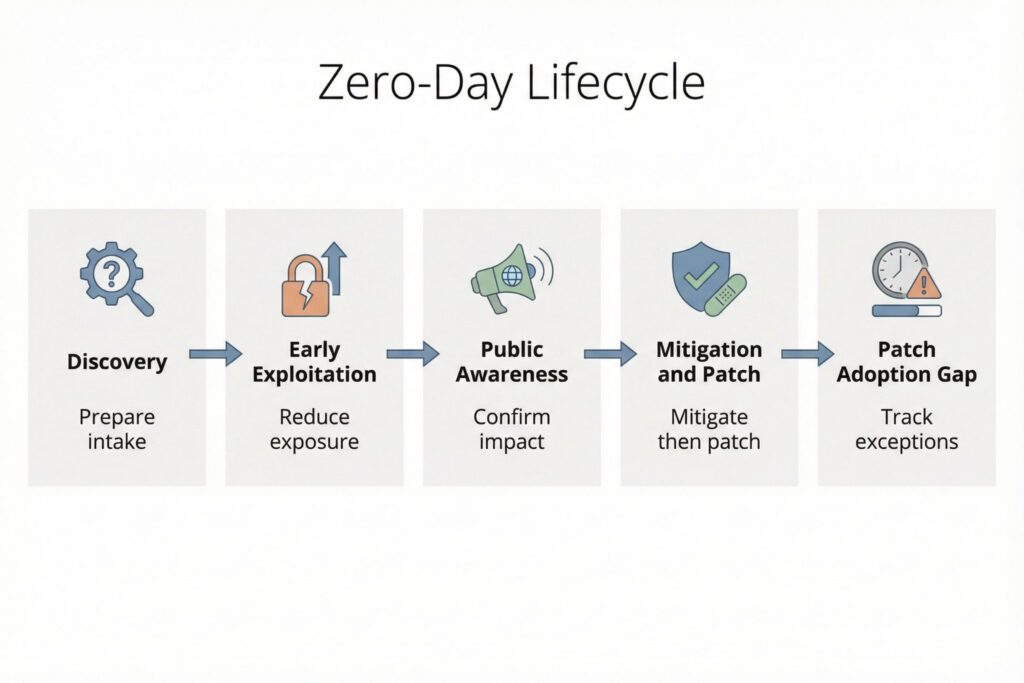
The table below maps common lifecycle stages to what defenders should do and what teams should produce. Incident response breaks down when actions are not captured in a shared record of scope, decisions, and residual risk.
| Lifecycle stage | What is happening | Defensive priority | Output to produce |
|---|---|---|---|
| Discovery and reporting | A flaw is found and may be privately reported to a vendor or coordinated disclosure program | Ensure you can receive and act on vendor advisories and defender-focused intelligence quickly | Intake note with affected products, version ranges, and initial exposure summary |
| Early exploitation | Some actors use the exploit before a fix is widely available | Reduce exposure and tighten controls around likely entry points | Containment decision log and scoped telemetry collection plan |
| Public awareness | Details become public through advisories, incident reports, or disclosure timelines | Confirm applicability, prioritize exposed assets, and communicate risk clearly | Affected-asset list with owners and change tickets |
| Mitigation and patch release | Workarounds, configuration changes, and patches emerge | Apply mitigations fast, then patch, then validate that exploitation paths are closed | Mitigation and patch coverage report with validation checks |
| Patch adoption gap | Fixes exist but are not fully deployed across all assets | Track residual exposure, especially internet-facing systems and privileged access paths | Exceptions register with expiry dates and compensating controls |
Disclosure timelines vary by program and vendor. Project Zero documents its 90 plus 30 approach in its vulnerability disclosure policy and publishes policy updates. For defenders, the operational takeaway is that the gap between upstream fixes and local deployment is a measurable risk period that should be tracked like any other exposure.
What To Check Before Patching
When a zero-day is suspected or confirmed, focus on evidence you can validate locally. Anchor on observed behavior in your environment and document what you checked, even when findings are negative. That record matters when guidance changes or leadership asks what risk remains.
Prioritize signals tied to exposure, identity, execution, and persistence. On external edges, watch for new scanning patterns against public endpoints and spikes in 4xx and 5xx responses on edge services. In identity systems, watch for anomalies such as impossible travel, abnormal refresh token usage, and new device registrations for privileged users. On hosts and workloads, watch for execution patterns that break baseline behavior, such as unexpected child processes from server applications, new scheduled tasks, or unusual command-line activity on servers that normally run stable workloads. Favor higher-confidence indicators like persistence and identity changes, including newly created admin accounts, modified conditional access policies, and unexpected changes to federation and SSO configurations. Review data access patterns such as unusual reads from sensitive repositories, bulk exports, or access from atypical service principals.
The goal is a repeatable minimum standard: collect the highest-value telemetry you already have, triage with consistent criteria, and maintain a single incident record showing which assets were evaluated, which mitigations were applied, and what residual exposure remains. Assumption: for most organizations, the fastest sources to query are identity provider audit logs, reverse proxy or load balancer logs, endpoint or server telemetry if deployed, and administrative audit logs in core SaaS platforms.
How To Respond During Exploitation
A zero-day response should run as a playbook, not improvisation. When exploitation is credible, assume some systems may already be compromised and keep containment decisions separate from long-term remediation so you do not destroy evidence or spread impact through rushed changes.
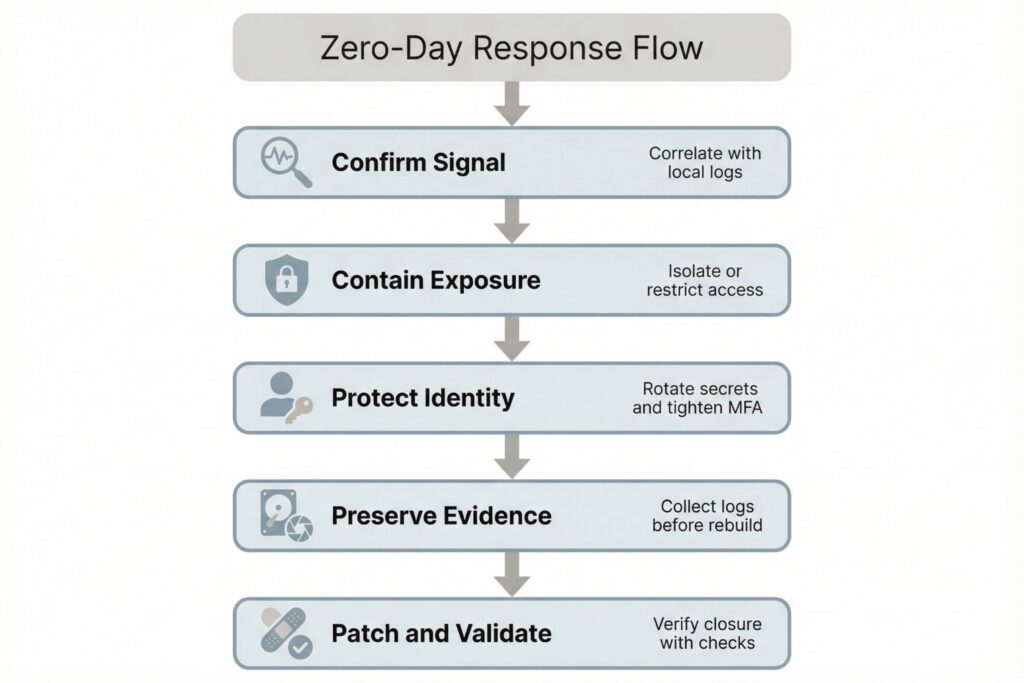
A practical mini-scenario illustrates the flow. Your monitoring flags repeated authentication failures followed by a successful login to an administrative portal from an unusual network provider. The on-call engineer correlates that login with a new service process spawning under an application account on a public-facing server, but the team also learns the server fleet lacks full endpoint telemetry due to performance constraints. The incident lead removes the server from the load balancer, rotates credentials tied to that application account, and applies vendor-recommended mitigations while a parallel team collects disk and memory artifacts. The outcome is controlled service impact with preserved evidence, followed by a clean rebuild and targeted validation once a patch is released.
In most environments, risk-reducing response actions cluster into five categories: reduce exposure by disabling vulnerable features or restricting inbound access; contain identity risk by tightening MFA and conditional access and rotating credentials that may have been accessed; preserve evidence by collecting logs and key system artifacts before rebuilding; deploy mitigations and patches in priority order and validate closure with targeted checks; and communicate through a shared incident record tracking affected assets, actions taken, user impact, and open gaps.
If a vulnerability is confirmed as exploited in the wild, treat prioritization as a governance decision with a documented rationale and explicit deadlines. CISA’s Known Exploited Vulnerabilities Catalog is one example of an authoritative signal that many organizations use to set remediation expectations. Assumption: if you adopt KEV as a trigger, you still need a local exceptions process, including who can approve them, what compensating controls are required, and when the exception expires.
Governance And Metrics Leaders Use
Zero-day readiness is determined before the event. Technical mitigations fail when teams cannot find affected assets, cannot deploy changes quickly, or cannot validate outcomes with evidence.
Operational realism starts with role clarity and working artifacts. The incident lead owns containment decisions and the running incident record. The identity owner is accountable for emergency policy changes and credential rotation. The service owner is accountable for uptime trade-offs and for confirming whether mitigations break functionality. Change management is accountable for documenting emergency changes and for ensuring exceptions have expiry dates. A minimal intake artifact that works in practice includes: affected product and versions, exposed entry points, internet-facing status, asset owners, current mitigations applied, evidence reviewed, and an exceptions section with compensating controls and review dates.
Small teams often benefit most from controls that reduce uncertainty, including centralized logging, strong identity controls, and simplified internet exposure. Cloud and hybrid environments should explicitly model where patch responsibility sits, especially for managed services versus self-managed workloads. Multi-tenant environments should maintain customer communication templates and a defined process for emergency configuration changes that includes approval paths and rollback criteria.
For leadership and security owners, outcome-linked metrics are most useful when they name a data source and an accountable owner. Examples include: time to identify potentially affected assets after an advisory is issued, sourced from the asset inventory or CMDB and owned by IT operations; time to apply interim mitigations to internet-facing systems, sourced from change tickets and owned by service teams; patch coverage over time for affected assets, segmented by criticality and exposure, sourced from patch management and owned by endpoint and server operations; and mean time to complete post-incident validation, sourced from the incident record and owned by the incident lead.
Finally, mature programs formalize how vulnerabilities are reported and handled, and ISO standards are commonly referenced for building predictable workflows around coordinated disclosure and vulnerability handling.
Frequently Asked Questions (FAQ)
Confirmation typically comes from vendor security advisories and incident response investigations. Teams also rely on defender-facing sources that track exploitation and on indicators observed in local telemetry.
Only if exposure and impact justify it. The usual sequence is to reduce attack surface quickly, apply mitigations, isolate high-risk assets first, then patch and validate.
Poor asset visibility, because teams cannot quickly identify which systems run the affected software or feature.
No. Internet-facing services and common software stacks can make smaller organizations viable targets once exploitation becomes repeatable. Weak identity controls and limited logging can further reduce the effort required to sustain access.
Validate configuration state and confirm patch versions on affected assets. Review identity and administrative changes made during the incident, then examine telemetry for post-patch exploit attempts against the same entry points.
Leave a Reply